

If you’ve ever spent 20 minutes searching for a pattern you know you bought, only to give up and buy something else instead (I may resemble that remark 😜) and that’s when a system for storing and organizing cross stitch patterns can make a real difference.
We cross stitchers know that we probably have three separate hobbies:
- collecting patterns
- collecting supplies
- actually stitching.
(Not just me, is it?) If your pattern collection has grown faster than your stitching time, a system for storing PDF patterns can make your collecting life a little easier.
Quick start checklist
- Create one folder for all your cross stitch patterns
- Add subfolders only if you’ll actually use them
- Download new purchases immediately (don’t leave them in email)
- Rename unclear filenames so you can find things later
- Use a binder with plastic sleeves for printed patterns
- Back up your folder somewhere safe
- Consider tracking your collection so you know what you own
One folder, one habit, and you’ll always know where your patterns are.
The real problem with PDF pattern storage
We usually don’t need to find shelf or craft room space for digital patterns, which makes it very easy to collect hundreds of them. But unlike a stack of paper charts you can flip through, PDFs become invisible the moment you download them.
Out of sight, out of mind, and eventually out of memory entirely.
The other issue? Etsy shops close. Websites disappear. That pattern you bought three years ago might not be available for re-download if the designer has retired. And if you’re relying on being able to re-download from your purchase history… that only works if the shop’s still there.
Having a system for cross stitch pattern organization means you can actually find and use what you’ve paid for, years from now if needed.
A simple system for organizing cross stitch patterns
You don’t need special software or a complicated setup to keep track of your digital cross stitch patterns. For me, just one folder and one habit made a huge difference.
Step 1: Create a dedicated folder
Make a folder called “Cross Stitch Patterns” (or whatever makes sense to you) somewhere you’ll remember. Your Documents folder works fine. So does a cloud drive like Google Drive or Dropbox if you stitch from multiple devices.
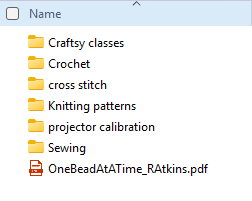
Inside that main folder, you can add subfolders if you want them. Some options that might work for you:
- By designer name
- By theme (Christmas, florals, samplers)
- By status (To Stitch, In Progress, Finished)
- By project type (SALs, quick stitch, large projects)
Set up the structure that suits your brain or way of working.
Or, don’t bother with subfolders at all. A single folder with everything in it is still much better than file links in a couple of email accounts or files scattered between your desktop and downloads folder.
Keep it lightweight enough that you’ll actually use it.
Step 2: Download immediately
This is the practice that makes everything else work.
When you buy a pattern, download it right away and move it to your folder. Don’t leave it sitting in your email or your Etsy purchases thinking you’ll deal with it later.
It really only takes a minute or two and then it’s done. because for me anyway, later never comes. Then the designer retires and you’ve lost it forever.
Step 3: Rename if needed
Some designers use helpful filenames like “Cottage_Garden_Sampler_SAL #1.pdf” and some use things like “FLO2847_v3.pdf” which tells you … very little.
Take ten seconds to rename the file to something you’ll recognize. Your future self will thank you.
What about printed patterns?
If you prefer to print your PDFs for stitching (and many of us do), you’ll want a system for the paper copies too. A binder with plastic sleeves works well. You can organize by designer, theme, or project status, and it’s easy to pull out what you need and slip it back when you’re done.
Our guide to cross stitch patterns for beginners has a section on printing PDFs or stitching from a tablet.
For SALs or multi-part patterns, keeping all the pages together in one sleeve along with any notes or project cards means everything stays in one place. If you’re stitching on the go, a project bag can keep your current printed pattern with your supplies.

Tracking the cross stitch PDFs you own
A folder system tells you where your patterns are, but it doesn’t give you a quick overview of everything you’ve collected. If you want to see your full library at a glance, a simple tracking page helps.
Our Cross Stitch Planner includes a Pattern Library page where you can log each pattern with the designer name, whether it’s digital or physical, the difficulty level, and when you bought it. It’s a quick way to see what you have, avoid buying duplicates, and maybe even remember that gorgeous pattern you bought two years ago and completely forgot about.

A note on backups
If your patterns live on your computer and nowhere else, they’re one hard drive failure away from disappearing. Consider keeping a copy on a cloud service, an external drive, or both. Takes five minutes to set up and you’ll be glad you did.
Frequently Asked Questions
What’s the best way to organize digital cross stitch patterns?
Create a dedicated folder on your computer or cloud drive, download patterns as soon as you buy them, and rename files so you can find them later. Subfolders by designer, theme, or status are optional but helpful if your collection is large.
How do I keep track of all the patterns I own?
A tracking sheet, spreadsheet or pattern library page lets you log each pattern with details like designer name, format, and date acquired. This helps you avoid buying duplicates and remember what’s in your collection.
Can I re-download patterns I’ve bought?
Usually yes, but only if the shop or designer is still active. If they’ve closed or retired the design, you may lose access. Download and save your patterns as soon as you buy them.



Leave a Reply